



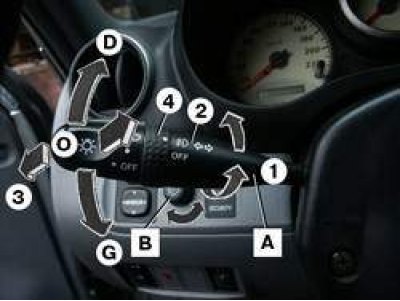
Figure 1.9. Direction indicator and headlight switch (A) and instrument panel illumination rheostat (B): 0 – lighting off; 1 – parking light is on; 2 – high or low beam is on; 3 – high beam headlights; 4 – switching headlights; D — right turn signal; G – left turn signal
The turn signal and headlight switch has the following positions (figure 1.9):
- 0 - lighting off;
- 1 - parking light is on;
- 2 - high or low beam is on;
- 3 - high beam headlights;
- 4 - switching headlights;
- D — right turn signal;
- G — left turn signal.
When the ignition is turned off with the high beam headlights on, a warning signal sounds for a few seconds.
To turn on the right turn signal move the switch up, to turn on the left turn, move the switch down.
When the turn signal is on, the indicator lamp in the instrument cluster flashes.
After turning the corner, the turn signal turns off automatically.
Signaling a turn before changing lanes. The switch should be pressed up or down until the back pressure increases and held in this position - the indicator lamp should flash simultaneously with the turn signal.
Light signal. Move the steering column switch towards the steering wheel, and the high beam lamp on the instrument panel will light up.
Switching to high or low beam headlights. Switching between low and high beam is done by moving the switch forward. When you switch to high beam, the high beam indicator lamp comes on.
Parking light. The parking lights only light when the ignition is off.
To turn on the parking lights on the right, move the switch up.
To turn on the left parking lights, move the switch down.
After removing the key from the ignition with the driver's door open, a buzzer sounds.
The instrument panel backlight rheostat, when the lighting is on, allows you to adjust the intensity of the illumination of the combination meter and instrument panel by turning the knob.