
Company Honda Company Ford Company Skoda Company Kia Company Mazda Company Mercedes Company Renault
English Русский
Български
Беларускі
Український
Српски
Hrvatski
Română
Polski
Slovenský
Magyar
Bookmark Articles Sitemap Contacts
ToyotaMan.ru


Camry Corolla Corona Carina Land Cruiser Highlander 4Runner RAV4 Others
RAV 4 XA20 (2000-2005) RAV 4 XA10 (1994-2000)

Replacing and adjusting the starter interlock switch (PNP) [Toyota RAV4 XA10]

  • Main
  • RAV4
  • XA10 (1994-2000)
  • Transmission
  • Automatic gearbox
  • Replacing and adjusting the starter interlock switch (PNP)
0
Contents: Adjustment ↓ Replacement ↓

Adjustment


If the engine can be started in any position other than "P" and "N", adjust the starter lock switch.

Apply the parking brake and block the rear wheels. Raise the front of the vehicle and support it on jack stands. Remove the engine compartment splash shield.

Set the selector lever inside the vehicle to the "N" position.

Loosen the starter interlock switch mounting bolts.

Set the gear selector lever on the gearbox to the "N" position.
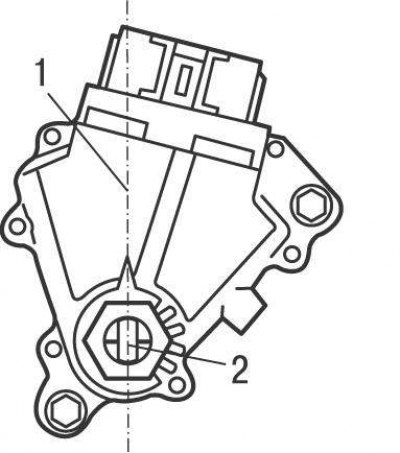


Figure 9.23. Alignment of line (1) on the starter interlock switch with groove (2) on the gear selector shaft on 1996 and 1997 single-drive models and 1996 to 2001 all-wheel drive models
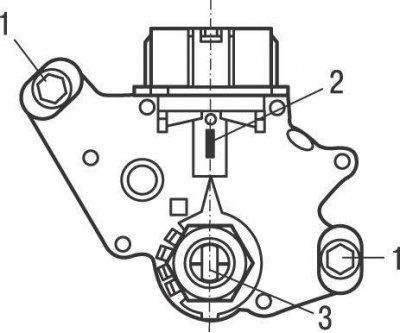


Figure 9.24. Alignment of line (2) on the starter interlock switch with groove (3) on the gear selector lever shaft and location of bolts (1) securing the switch on models produced since 2001


Align the line on the starter lock switch with the groove on the gear selector shaft (figure 9.23, 9.24).

Tighten the starter lock switch mounting bolts and check its operation. If the engine can still be started in any position other than "P" and "N", replace the switch.

Replacement


Turn off the ignition and disconnect the ground wire from the battery.

Apply the parking brake and block the rear wheels. Raise the front of the vehicle and support it on jack stands. Remove the engine compartment splash shield.

(The full article is posted on the website: «ToyotaMAN»)

Set the selector lever inside the vehicle to the "N" position.

Loosen the nuts and remove the gear selector lever from the gearbox shaft.

Disconnect the electrical connector from the switch.

Remove the bolts and switch from the gear selector shaft of the gearbox.

Align the line on the switch with the groove on the gear selector shaft and install the switch on the shaft.

Turn the switch until the line on the starter lock switch aligns with the groove on the gear selector shaft (see figure 9.23, 9.24). Tighten the switch mounting bolts and connect the electrical connector to it.

Install the gear selector lever on the shaft and connect the ground wire to the battery. Check the operation of the switch. The engine should only be possible to start in selector positions "P" and "N".
This article is available at: russian, bulgarian, belarusian, ukrainian, serbian, croatian, romanian, polish, slovak, hungarian
The article material has been checked: Kolokoltsev Grigory
Share information:
◀ Previous
RAV 4 XA10: Automatic gearbox
Next ▶

Replacing and adjusting the selector cable
Checking, adjusting and replacing the throttle control cable
Replacing the sealing cuffs
Automatic transmission diagnostics
Checking the selector lever and ignition lock system
Removal and installation an automatic transmission with one drive axle
Removal and installation an automatic transmission on all-wheel drive…
Similar articles on other Toyota models

➥ Checking, replacing and adjusting the starter interlock… Toyota Camry XV10 (1991-1996)
➥ Checking, adjusting and replacing the start enable switch… Toyota Cruiser 100 (1998-2007)
➥ Clutch Lock Switch — Checking, Adjusting and Replacing Toyota 4Runner N120 (1989-1995)
➥ Adjusting the starting switch Toyota Corolla E80 (1983-1990)
➥ Checking and adjusting the engine start inhibit switch Toyota Corona T190 (1992-1997)
➥ Checking and adjusting the engine start inhibit switch Toyota Carina T190 (1992-1996)
Link in different formats to this article
Comments and feedback from visitors
No comments yet


Add two numbers 46 + 32


RAV 4 XA20 (2000-2005) 
  • General information
  • Introduction to manual
  • User manual
  • Daily care
  • Maintenance (petrol)
  • Maintenance (diesel)
  • Troubleshooting
  • Power unit
  • Gasoline engines (before 2000)
  • Petrol engines (since 2001)
  • Diesel engines
  • Engine overhaul
  • Cooling and heating
  • Fuel system (petrol)
  • Fuel system (diesel)
  • Engine electrical equipment
  • Control system (petrol)
  • Control system (diesel)
  • Transmission
  • Manual gearbox
  • Automatic gearbox
  • Clutch and drive shafts
  • Chassis, running gear
  • Brake system
  • Front suspension
  • Rear suspension
  • Steering system
  • Body and interior
  • Exterior (external elements)
  • Interior (internal elements)
  • Doors, locks and windows
  • Electrical equipment
  • Equipment and devices
  • Electrical circuits
RAV 4 XA10 (1994-2000) 
  • General information
  • User manual
  • Maintenance
  • Power unit
  • Petrol engine 3S-FE
  • Petrol engine 1AZ-FE
  • Engine overhaul
  • Cooling and air conditioning
  • Fuel and exhaust system
  • Ignition system
  • Toxicity reduction system
  • Transmission
  • Clutch
  • Mechanical gearbox
  • Automatic gearbox
  • Cardan and drive shafts
  • Chassis, running gear
  • Brake system
  • Car suspension
  • Steering
  • Body and interior
  • Exterior (external elements)
  • Interior (internal elements)
  • Doors, locks and windows
  • Electrical equipment
  • Equipment and devices
  • Power devices
  • Electrical circuits
ToyotaMan.ru © 2018–2026 • Mobile version • Interesting about Toyota • Administration • Sitemap: EN BG BY UA RS HR RO PL SK HU • Search system • Bookmark
Camry Vista-V40 • Camry XV10 • Camry XV20 • Camry XV30 • Corolla Verso-AR10 • Corolla E80 • Corona T190 • Carina T170 • Carina T190 • Land Cruiser J70 (diesel) • Land Cruiser J60 (petrol) • Land Cruiser J100 • Highlander XU20 (petrol) • 4Runner N120 • RAV4 XA10 • RAV4 XA20 • Duet M100 • Dyna Y50 •
We require cookies to enable some interactive features. Is that ok with you?