Contents: Replacing the transmitter battery ↓ Transmitter registration ↓ Checking the operation of the…↓ Checking the receiver ↓
Replacing the transmitter battery
Replacement is made according to the drawings "Replacing the transmitter battery (models before 2000.)" and "Replacing the transmitter battery (models since 2000.)".
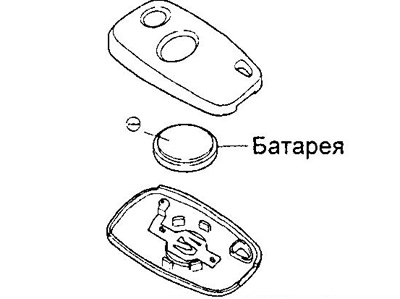
Replacing the transmitter battery (models before 2000.).
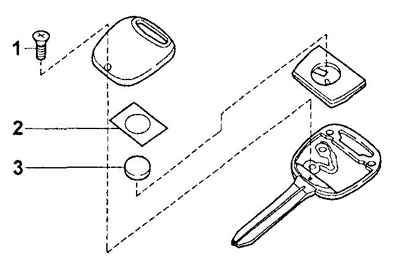
Replacing the transmitter battery (models since 2000.).
1 - self-tapping screw,
2 - seal,
3 - battery.
Transmitter registration
Note:
- When registering a new transmitter, information about the old transmitter is erased.
- Removing the transmitter battery does not erase information about it.
Initial conditions for registration:
- the key is not inserted into the ignition;
- the wire is disconnected from the negative terminal of the battery.
1. Connect the cable to the negative terminal of the battery.
2. Close all doors.
3. Within 15 seconds, turn the driver's door lock to the "UNLOCK" position at least five times.
4. The ignition switch should automatically switch from the "UNLOCK" position to the "LOCK" position and back.
5. Turn the ignition switch to the "UNLOCK" position within 5 seconds.
6. In case of registration of one transmitter, the ignition switch should automatically move to the following positions: "LOCK" → "UNLOCK", which corresponds to successful registration.
7. If you register two transmitters, to register the second transmitter, follow the steps described in paragraphs "3" - "5".
Checking the operation of the transmitter
Note: The key is not inserted into the ignition switch during the test.
1. Make sure the windows roll down when you hold the transmitter's "UNLOCK" button for more than 1.5 seconds. Make sure the windows stop when you release the button.
2. Make sure that the windows go up when you hold the transmitter button ("LOCK") for more than 1.5 seconds. Make sure that the windows stop when you release the button.
Checking the receiver
The check is carried out by connecting the receiver connector terminals to ground according to the "Receiver Check" table.
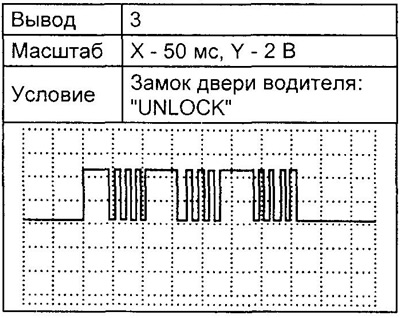
Oscillogram 1.
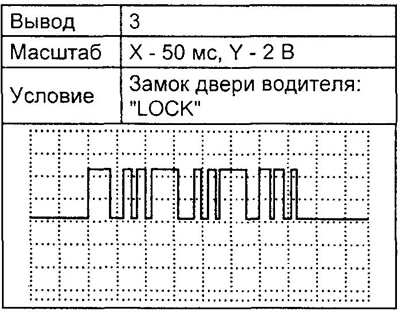
Oscillogram 2.