



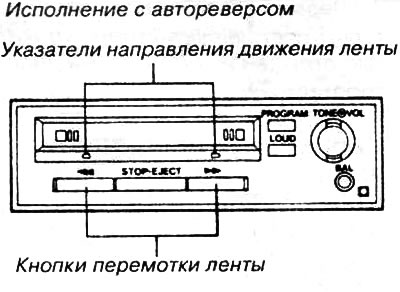
The cassette player automatically switches on and the radio switches off. At the end of the tape, the direction of the tape automatically changes and the other side begins to play.
To rewind or rewind, first set the direction of the tape using the tape direction indicator. Then press the corresponding rewind key. To finish rewinding, press the key lightly "STOP. EJECT". The cassette player will switch back to playback mode.
To play the other side of the tape, press the "PROGRAM" button.
To eject the cassette, press the button all the way down "STOP. EJECT".
To change the volume, rotate the "VOL" knob.
To balance the sound from the left and right speakers, rotate the "BAL" control.
To set the tone, rotate the "TONE" knob.
To increase the volume of high and low tones, press the "LOUD" button. Pressing this button again turns off this mode.
Design with automatic cassette ejection
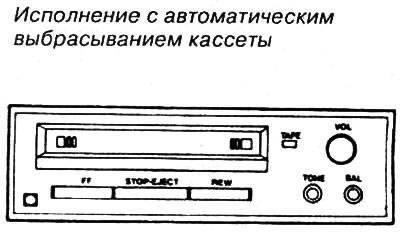
With this design, the cassette automatically ejects at the end of the side. Except for this, the remaining functions of such a player correspond to the functions of a player with auto-reverse.
(The full article is posted on the website: «www.toyotaman.ru»)
To play the other side of the tape, remove it, turn it over and insert the other side into the player.