



Contents: Rewind ↓ Noise reduction system ↓ Search for a melody ↓ Skipping empty spaces ↓ Quick view of the entry ↓ Repeat recording ↓ Reverse ↓
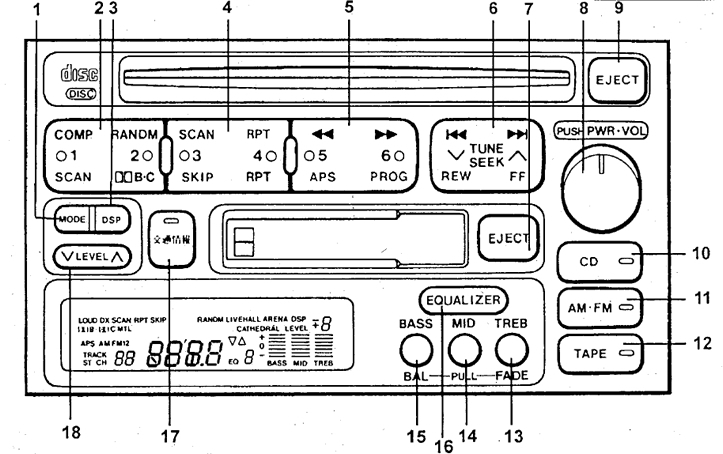
The radio is switched on by pressing button 8, and switching the radio to tape recorder mode is done by pressing button 12 "TAPE". When inserting a cassette, the radio automatically switches to tape recorder mode. To remove the cassette, press button 7.
Rewind
To rewind the tape, press button 6 (rewind - "REW", forward - "FF"). To stop rewinding, press rewind button 6 again or button 12 "TAPE".
Noise reduction system
When listening to tapes recorded using the "DOLBY" or "DOLBY B" noise reduction system, press button 2. Each press of this button switches in the following sequence: "DOLBY (B)NR" → "DOLBY (C)NR" → "DOLBY OFF". Pressing it again turns the system off.
Search for a melody
This function is designed to jump to any of the 9 records located before or after the current playback position.
To do this, press the 5 "APS" button as many times as you need to go to the records (when going back, take into account the current entry). After that, press the rewind button 6 (to go back - to "REW", forward - "FF".
To stop rewinding, press the rewind button again, or press button 12 "TAPE".
Note: If the pause between recordings is less than 3 seconds or there are extraneous sounds, this function may not work properly.
Skipping empty spaces
This function is designed to rewind empty spaces on the tape. To turn it on, press button 13 "SKIP". To turn it off, press the button again.
Note: This feature may not work properly if:
- The pause between recordings is less than 15 seconds.
- There are extraneous sounds between the recordings.
- The beginning and end of the recording cannot be clearly defined.
Quick view of the entry
Pressing button 2 "SKAN" plays 12 seconds of each recording in order. Pressing button "SKAN" again will continue playing the current melody.
Repeat recording
To play the current recording in a loop, press button 4 "RPT". To turn off the repeat, press the button again.
Note: If the pause between recordings is less than 3 seconds or there are extraneous sounds, this function may not work properly.
Reverse
Changing the direction of cassette playback is done by pressing button 5 "PROG".