



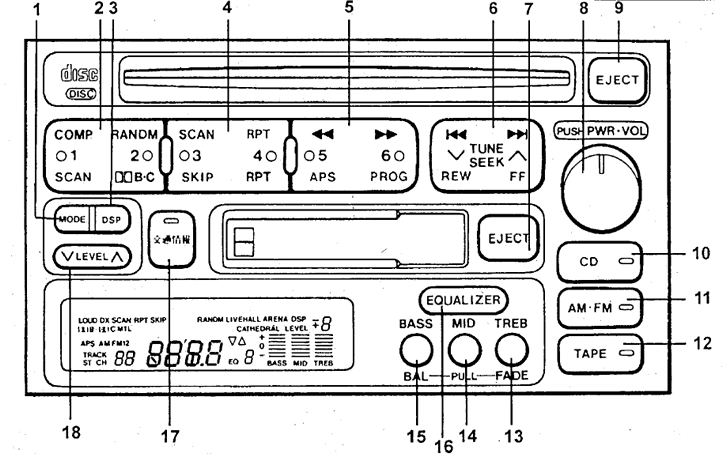
Tuning radio stations
Press button 6 until you hear a beep (automatic radio station search will be turned on). The search will stop when a stable signal is found. If the signal is weak, if the automatic search does not fix the setting, press the setting button again (automatic search will be disabled), and adjust manually one step at a time.
Programming settings
The settings of the most frequently listened to radio stations can be saved into memory. To do this, tune in to the desired radio station, then press and hold one of the buttons (2, 4 or 5) until a beep. Switching to the tuned radio station is done by briefly pressing the desired button.
Note: if the batteries are absent for a long time, the radio memory is erased and the factory settings are restored.
"Favorite Station"
You can set the most frequently listened to radio station to a separate button 17. When you press this button, this station is immediately turned on, regardless of which device was working before.
New radios are tuned to 1620 kHz.