



Radio
The quality of radio signal reception may vary significantly while the vehicle is moving due to terrain features, weather conditions and proximity to sources of electromagnetic radiation.
Cassette player
Clean the tape drive of your radio with a cleaning cassette about once a month. This will ensure consistent playback quality.
It is not recommended to use 120-minute cassettes, as the thin film can cause damage to the film or cause it to become entangled in the tape drive mechanism.
Do not expose audio cassettes to high temperatures, such as under a windshield. This may cause deformation of the cassette case.
CD player
In cold weather or high humidity, due to fogging of the disc surface and optical elements of the player, playback failures are possible. After normalization of humidity, the system operation is restored.
Strong vibration may cause distortion and interruptions in playback. This is not a malfunction. Do not leave in direct sunlight, protect the disc surface from scratches.
Equalizer
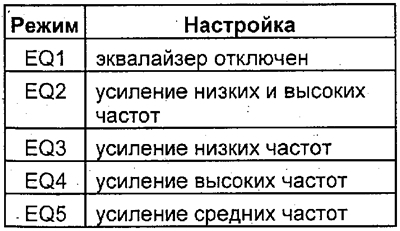
By pressing button 16 "EQUALIZER" the tone of the sound is adjusted.
By successive pressings of button 16, one of the settings is selected, and one of the following messages appears on the display:
Pressing the "DSP" button turns on the "surround" sound mode, pressing it again turns it off. Selecting sound options ("HALL", "LIVE", "CATHEDRAL", "DOME") is selected using the "MODE" button.