



Contents: Extraction ↓ Installing a new element ↓
Extraction
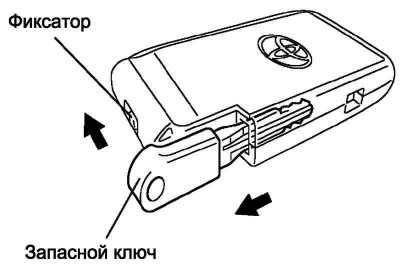
Fig. 1.75. Removing the spare key from the remote control
Move the lock in the direction indicated by the arrow in Figure 1.75. Remove the spare key from the remote control.
Note: Extreme care must be taken when handling these electronic components.
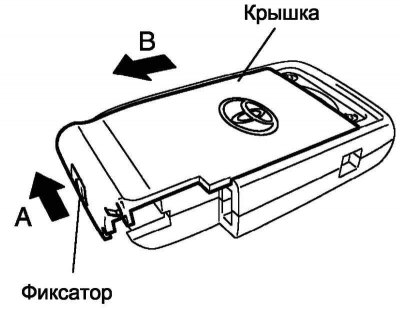
Fig. 1.76.
Pull and hold the lock in the direction indicated by arrow A in Figure 1.76. Slide the cover in the direction indicated by arrow B in Figure 1.76 and remove the cover.
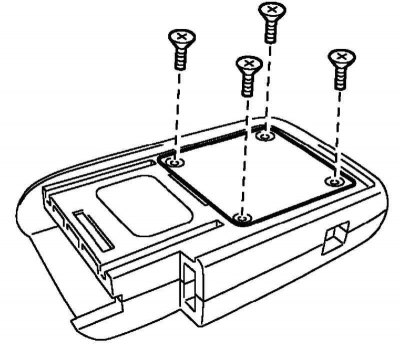
Fig. 1.77. Removing the battery cover
Using a screwdriver, remove the 4 screws and remove the back cover as shown in Figure 1.77.
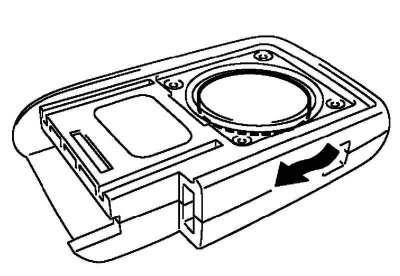
Fig. 1.78. Removing the battery
Remove the remote control battery as shown in Figure 1.78.
Note: Do not touch the terminals with your fingers.
Note: Do not use force when removing the lithium battery. This may damage the contacts.
Note: Do not handle the battery with wet hands. Moisture may cause corrosion.
Note: Do not touch or move parts inside the remote control as this may cause damage to the remote control.
Installing a new element
Install the new lithium battery with the positive (+) side facing up as shown in the figure.
Note: Make sure the positive (+) and negative (–) ends of the battery are oriented correctly.
Note: Care must be taken not to bend the battery electrode during installation.
Note: Care must be taken to prevent dust and oil from getting inside the remote control.
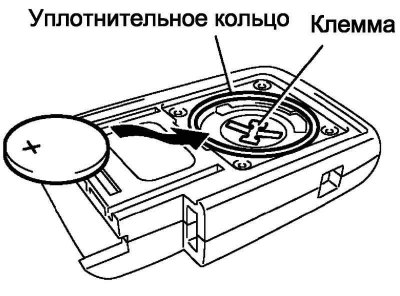
Fig. 1.79. Correct installation of the power supply element
Make sure that the sealing ring is not damaged and is in place, and install the cover (Fig. 1.79).
Use a screwdriver to tighten the 4 screws.
Note: If the cover is not firmly attached, it may cause poor contact between the lithium battery and the terminal.
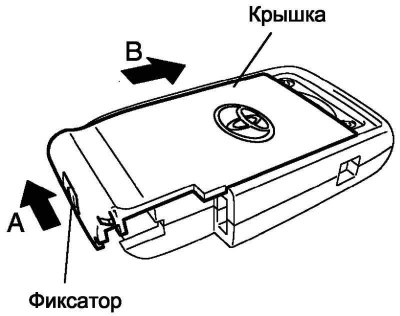
Fig. 1.80. Installing the remote control cover
Move and hold the lock in the direction indicated by arrow A in Figure 1.80. Install the cover by moving it in the direction indicated by arrow B in Figure 1.80.
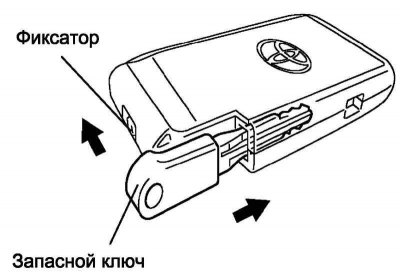
Fig. 1.81. Installing a spare key
Pull and hold the lock in the direction indicated by the arrow in Figure 1.81. Insert the spare key.
Attention! After installing the battery, press any button on the door lock remote control. Make sure the LED lights up.