



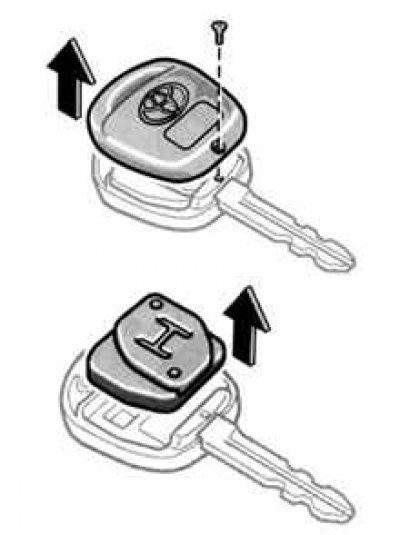
Fig. 1.30. Removing the module and key housing
Loosen the screw, then open the cover. Remove the module from the key housing (Fig. 1.30).
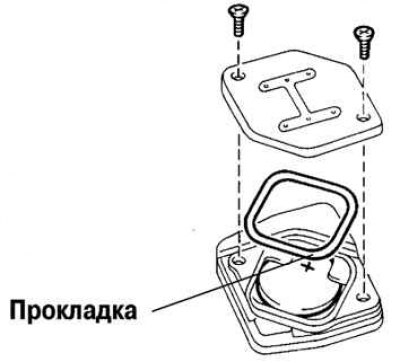
Fig. 1.31. Removing the cover from the wireless device module
Remove the two screws to remove the module cover. Remove the discharged battery (Fig. 1.31).
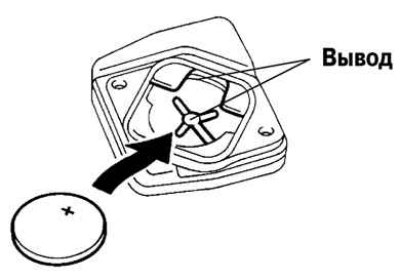
Fig. 1.32. Installing a power supply into a wireless device
Install the new battery with the positive terminal facing up (Fig. 1.32).
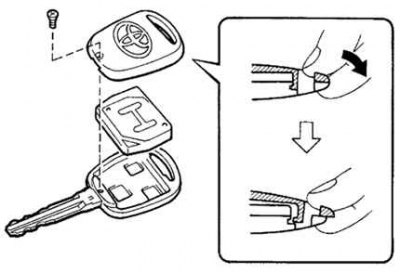
Fig. 1.33. Installing the wireless remote control cover
(Publication Reprinted from a web portal: toyotaman.ru)
Install the cover and secure it with two screws. Before doing this, make sure that the gasket is installed on the module. Install the module in the key body and secure the cover with a screw (Fig. 1.33).
Press any switch on the wireless key and make sure the indicator light turns on.
After replacing the battery, check that the key works properly.
Caution: Make sure the positive and negative terminals of the battery are positioned correctly relative to each other.
Do not replace the battery with wet hands. Moisture may cause unwanted corrosion.
Do not touch or move the components inside the transmitter, otherwise it may interfere with its proper operation.
Be careful not to bend the electrode when inserting the battery and to prevent dust or oil from sticking to the body.
Be careful not to lose the screws and sealing ring.
Close the lid tightly.