
Center differential lock system
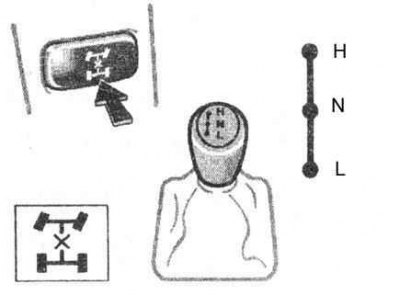
Operate the mode select lever and the center differential lock switch (refer to accompanying illustration) to select the following modes of the transfer case and center differential.
«H» (overdrive position)
Position «H» lever of the all-wheel drive regulator provides the mode of locking or unlocking the center differential, depending on the position of the corresponding button.
Use this position with the center differential unlocked for normal driving on all types of roads, from dry paved roads to wet roads and roads covered in ice or snow. This position provides greater savings, a quieter ride, less wear and better vehicle handling.
Use this position with the center differential locked to increase traction, if you feel a loss of power, such as when the wheels are slipping in «H» with unlocked center differential.
«N» (neutral position)
No power is transferred to the wheels. Use this position only when operating a winch or other equipment. The car must be stopped.
«L» (gear reduction position, center differential locked)
Use this position for maximum power and traction. use position «L» in difficult driving conditions, when the car is difficult to control even in the mode «H» with locked center differential.
Turning on of a control lamp of blocking of interaxal differential testifies to activation of blocking.
Keep in mind that if the R / L does not go out when the center differential lock button is pressed, drive the car straight when accelerating or decelerating, or turn around.
Switching procedure
1. To switch between unlock and lock position modes «H» press the center differential lock button.
2. To switch between gears «H» and «L» stop the car, put the gearbox in position «N» and shift the four-wheel drive control lever.
Note. Never shift the four-wheel drive control lever if the vehicle is slipping. Stop the vehicle from sliding or circling before shifting.
Front and rear differential lock system
1. The front and rear differential lock system is designed to be used only when wheels are spinning in a ditch or on slippery or uneven roads. This system is effective in case of slipping of one of the wheels or one right or one left pair of wheels.
Note. Do not use the rear differential lock in conditions other than those described above. Otherwise, heavy steering effort and careful steering when making turns will be required. Especially using a front differential as a complement to the rear differential will make steering extremely difficult and can cause the vehicle to skid during acceleration or deceleration of the engine.
2. To lock the rear differential, push and turn the switch clockwise until you hear a click. If that doesn't help, turn the switch all the way clockwise to lock the front differential in addition to the rear.
3. Be sure to stop the vehicle before performing differential lock.
4. For easy locking, turn the lock switch and gently depress the accelerator pedal.
5. If the switch is in the on position, the control lamp will flash. Wait a few seconds for the system to complete the operation. Once the differential is locked, the warning light will stop flashing and stay on.
6. If the rear differential is locked, the anti-lock brake system will not work. If the indicator lamp comes on at this time «ABS», This is fine.
Note. Do not lock the differential until the wheels stop spinning. Otherwise, the vehicle may move in an unexpected direction if the differential is locked, which may result in possible damage to the components of the differential lock. Do not drive at speeds over 8 km/h with the differential locked.
7. To unlock the differential, turn the switch all the way counterclockwise.
8. Unlock the differential as soon as the vehicle moves off.
9. For simple unlocking, turn the steering wheel slightly in either direction while driving.
10. If the differential is disengaged, the control lamp will go out.
11. The differential will also be unlocked when the four-wheel drive control lever is moved to the «H». Be sure to turn off the switch after using this function.
12. To check the indicator lamp, turn the ignition key to position «ON», however, do not start the engine.
Rear differential lock system
The rear differential lock system is designed to be used only when wheels are spinning in a ditch or on slippery/rough roads.
This differential lock system is effective in case of slipping of one of the rear wheels.
1. To lock the rear differential, push and turn the switch clockwise until you hear a click.
2. Be sure to stop the vehicle before locking the differential.
3. For simple locking, turn the lock switch and gently depress the accelerator pedal.
4. If the switch is in the on position, the control lamp will flash. Wait a few seconds for the system to complete the operation. After the differential is locked, K/L will stop flashing and will be on permanently.
5. If the rear differential is locked, the ABS system will not work. If at this time the ABS light comes on, this is normal.
Note. Do not lock the differential until the wheels stop spinning. Otherwise, the vehicle may move in an unexpected direction if the differential is locked, which may result in an accident. It may also result in possible damage to the differential lock components. Do not drive at speeds over 8 km/h with the differential locked.
6. To unlock the differential, turn the switch fully counterclockwise.
7. Unlock the differential as soon as the vehicle moves off.
8. For simple unlocking, turn the steering wheel slightly in either direction while driving.
9. If the differential is disengaged, the control lamp will go out.
10. The differential will also be unlocked if you move the four-wheel drive control lever to «H». Be sure to turn off the switch after using this function.
11. To check the indicator lamp, turn the ignition key to position «ON», however, do not start the engine.