



Remove the lower right engine shield.
Remove the cylinder head cover for bank 2.
Remove the fan and alternator V-belt.
Remove the crankshaft pulley.
Use a knife to cut the working edge of the seal.
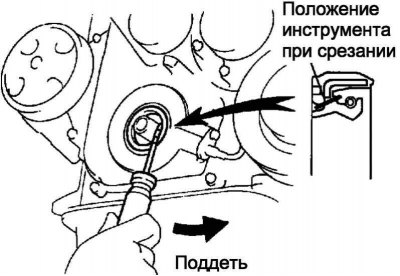
Fig. 2.176. Removing the oil seal
Remove the seal using a screwdriver with the blade wrapped in electrical tape (fig. 2.176).
Note: After removing the oil seal, check the crankshaft for damage. If damaged, sand the crankshaft surface with 400 sandpaper.
Apply a general purpose grease to the edge of the new seal.
Note: The seal seating surface must be free of sand, dirt and other foreign particles.
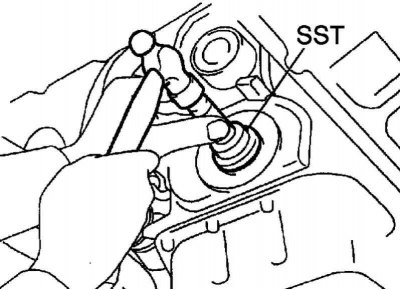
Fig. 2.177. Pressing in the oil seal
Using the SST 09223-22010 drift and a hammer, press in the new seal until its surface is flush with the edge of the timing chain cover (fig. 2.177).
Note: Press the seal strictly along the axis of the socket, without distortion.
Note: Remove excess grease from the crankshaft.
Replacing the rear crankshaft oil seal
Remove the manual transmission and clutch basket assembly.
Remove the clutch disc assembly.
Hold the crankshaft using SST 09960-10010.
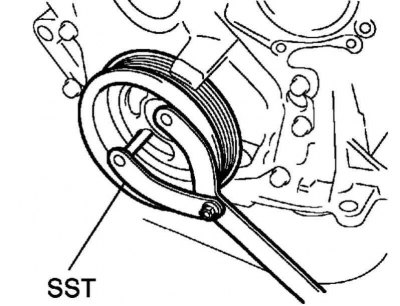
Fig. 2.178. Removing the flywheel
Remove 8 bolts and flywheel (fig. 2.178).
Use a knife to cut the working edge of the seal.
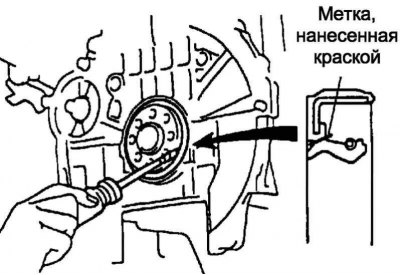
Fig. 2.179. Removing the oil seal
Remove the seal using a screwdriver with the blade wrapped in electrical tape (fig. 2.179).
Note: After removing the oil seal, check the crankshaft for damage. If damaged, sand the crankshaft surface with 400 sandpaper.
Apply general purpose grease to the edge of the new seal.
Note: The seal seating surface must be free of sand, dirt and other foreign particles.
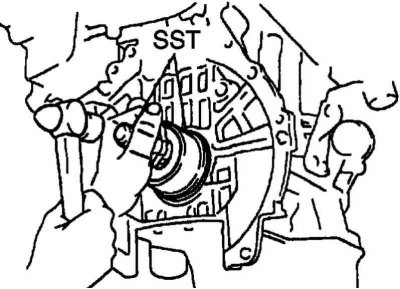
Fig. 2.180. Pressing in the seal
Using the SST 09223-15020, 09950-70010 drift and a hammer, press in the new seal until its surface is flush with the edge of the rear seal cover (fig. 2.180).
Note: Press the seal strictly along the axis of the socket, without distortion.
Note: Remove excess grease from the crankshaft.
Hold the crankshaft with SST 09960-10010
Clean 8 bolts and 8 bolt holes.
Apply thread locking compound to 2 or 3 threads of the 8 bolts.
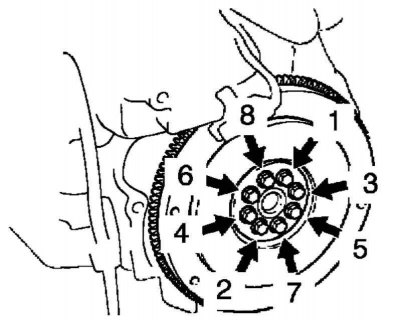
Fig. 2.181. Sequence of tightening the flywheel mounting bolts
Tighten the 8 bolts evenly in several stages, following the sequence shown in Figure 2.181.
Tightening torque: 49 Nm.
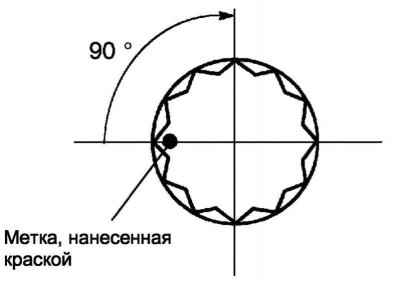
Fig. 2.182. Places of application of marks
Mark the bolts with paint as shown in Figure 2.182.
Tighten the bolts 90° further in the same sequence as when the bolts were first installed.
Make sure the marks are rotated 90° from their original position.
Install the remaining components in the reverse order of removal.