



Contents: Turning the system on and off ↓ Switching between functions ↓ Timbre and balance ↓ Radio receiver antenna ↓ Cassette player ↓
Type 1: L*M*U ETR radio/cassette player
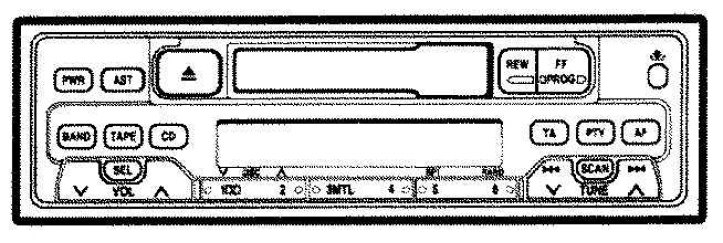
Type 2: L*M*U ETR radio/cassette player
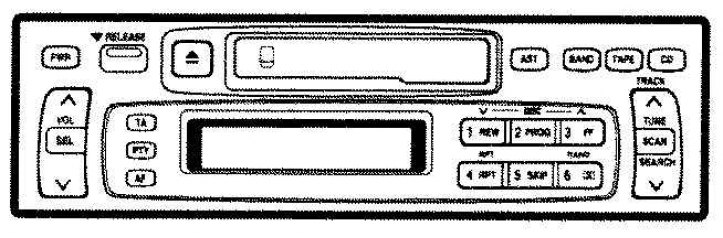
The audio system operates when the ignition switch is in the "ACC" or "ON" position.
Turning the system on and off
Press the "PWR" button to turn the audio system on and off. Press the button "BAND", "CD" or "TAPE" to enable this function without pressing the "PWR" button.
You can turn on the cassette player by inserting a cassette tape or a compact disc.
You can turn on the cassette player by ejecting the cassette tape. If the audio system was previously turned off, the entire audio system will be turned off after ejecting the cassette tape. If the radio was previously turned on, it will be turned on again.
Switching between functions
Press the button "BAND", "CD" or "TAPE" if the system is already on but you want to switch from one function to another.
Timbre and balance
For details on the audio system's tone and balance controls, see its description.
The sound of an audio system is primarily determined by the mixing of high and low frequency levels. In general, different types of music and speech programs usually sound better with different high and low frequency settings.
(The article is taken from a web resource: www.ToyotaMAN.ru)
A good balance of left and right stereo channels and front and rear levels is also very important. Remember that when listening to a stereo recording or radio broadcast, changing the right/left balance will increase the volume of one group of sounds while decreasing the volume of another group.
Radio receiver antenna
To lower the antenna, turn off the audio system by pressing the "PWR" button or turning the ignition button to the "LOCK" position.
Cassette player
When inserting the cassette, the side with the visible tape should be facing to the right.