



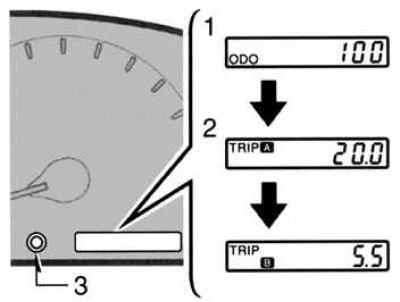
Fig. 1.53. Odometer
This indicator shows the odometer and two trip meters (Fig. 1.53).
1. Odometer – shows the total mileage of the vehicle.
2. Two odometers – show two independent odometer values since the last time each was set to zero.
You can use one trip meter to determine fuel economy and the other to measure the mileage of a single trip. All trip meter data is erased when the power source is disconnected.
3. Tripmeter reset button – resets the two tripmeters to zero and also changes the tripmeter display.
To change the counter display, quickly press and release the button. The counter display will change in order from the odometer to tripmeter A to tripmeter B, and then return to the odometer each time the button is pressed.
To reset the odometer A to zero, first display the odometer A reading, then press and hold the button until the odometer is set to zero. The same steps are performed to reset the odometer B reading.
The indicator remains on for approximately 10 minutes after the ignition is turned off. To turn on the instrument panel lighting, turn the headlight switch off and on again.
(The original article is on the portal: www.ToyotaMan.ru)