



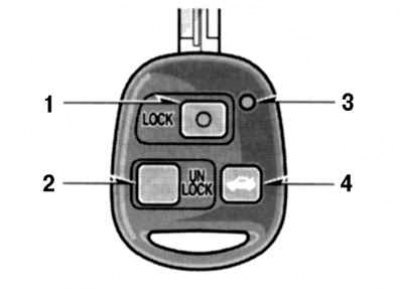
Fig. 1.26. Remote wireless device: 1 - LOCK switch; 2 - UNLOCK switch; 3 – indicator lamp; 4 – trunk lid opening switch
The wireless remote control system is designed to lock and unlock all doors or open the trunk lid from a distance of approximately 1 m from the vehicle (Fig. 1.26).
When using any switch, press it slowly and carefully. At this moment, the indicator lamp will flash once.
The wireless remote key is an electronic component. Please follow the instructions below to avoid damaging the key.
- Do not leave the key in places where the temperature may rise, such as on the dashboard.
- Do not disassemble the key.
- Do not hit the key against other objects or drop it.
- Avoid getting the key into water.
You can use up to 4 wireless remote keys for the same vehicle. If the wireless remote key does not operate the doors or does not function from a normal distance, or if the indicator light on the key is dim or does not turn on, try the following.
- Check if there is a radio transmitter nearby, such as a radio station or airport, that may interfere with the normal operation of the key.
- The battery may be dead. Check the battery in the key.