



Contents: Examination ↓ Checking the speedometer readings…↓ Checking the speedometer…↓ Checking the speedometer sensor ↓ Checking the speedometer sensor…↓ Checking the tachometer ↓ Checking the coolant temperature…↓ Checking the coolant temperature…↓ Checking the fuel gauge ↓ Checking the fuel level sensor ↓ Checking the fuel reserve sensor ↓ Checking the indicator and sensor…↓ Checking the trip switch ↓ Checking the rheostat ↓ Checking the seat belt sensor ↓ Checking the oil pressure sensor ↓ Checking the lamp malfunction…↓ Checking the brake system indicator ↓ Checking the parking brake sensor ↓ Checking the Low Brake Fluid Level…↓ Checking the limit switch ↓ Checking the automatic transmission…↓ Checking the indicator and buzzer…↓ Checking the overdrive indicator ↓ Checking the automatic transmission…↓
Examination
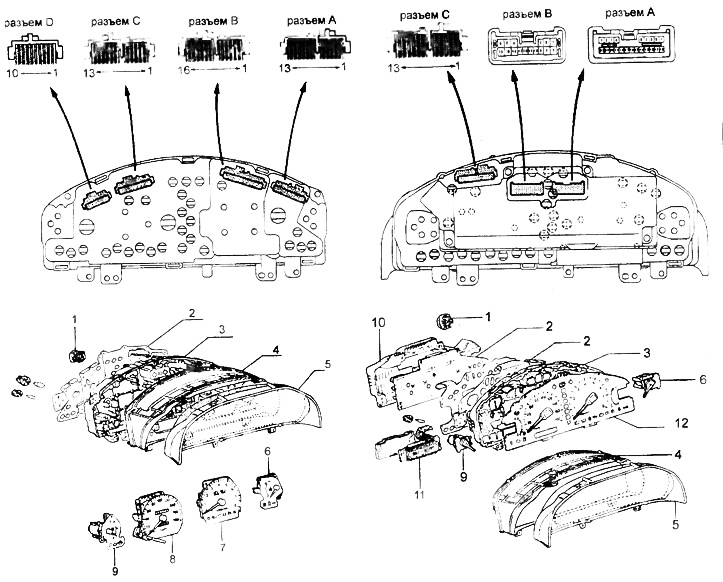
Instrument cluster.
1 - Reversing warning buzzer,
2 - instrument cluster board,
3 - body,
4 - instrument cluster or instrument cluster visor,
5 - glass,
6 - coolant temperature indicator,
7 - tachometer,
8 - speedometer,
9 - fuel level indicator,
10 - back cover,
11 - electronic mileage counter unit,
12 - instrument cluster panel.

Instrument cluster circuit check table
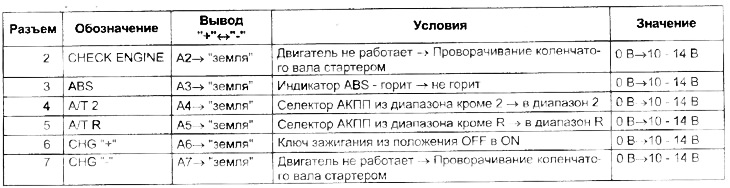
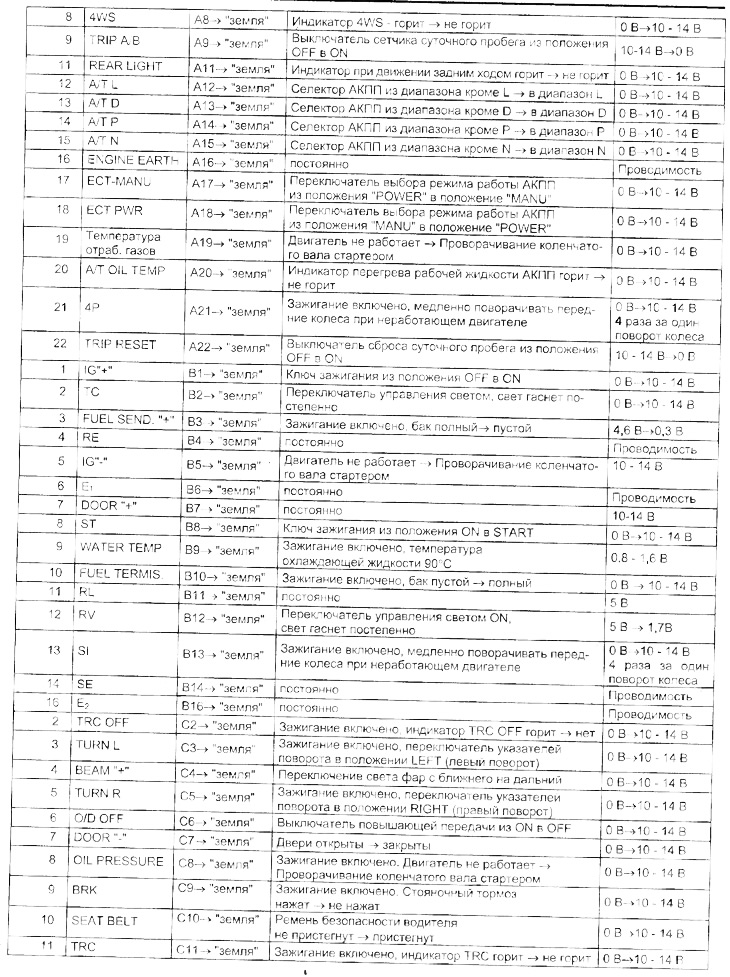
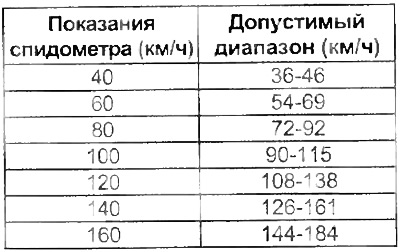
Checking the speedometer readings (analog panel)
1. Connect the tester and compare the tester and speedometer readings.
Checking the speedometer (analog-digital instrument cluster)
1. Checking the signal.
a) Remove the instrument cluster assembly.
b) Unscrew 4 screws and remove the lower housing.
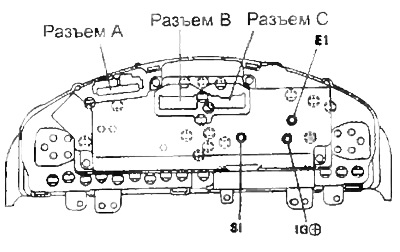
c) Connect connectors A, B and C.
d) Check the conductivity and voltage between the terminals and the "ground" according to the table "speedometer check (analog-digital instrument cluster)".
Checking the speedometer sensor
1. Checking the work.
a) Remove the speed sensor.
b) Connect the battery to terminals "1" (+) and "2" (-).
c) Slowly turn the shaft and check for voltage between terminals "2" and "3".
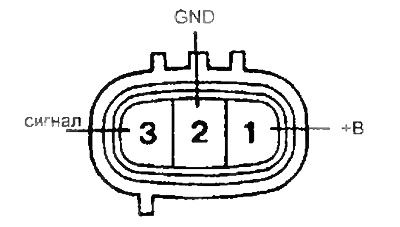
d) Check that the voltage changes 4 times per revolution of the sensor shaft (appears and disappears).
If the operation differs from the description, replace the sensor.
Checking the speedometer sensor (inside the instrument cluster)
Note: The test is performed with the ignition on and the connector connected.
1. Checking the work.
a) Disconnect the speed sensor.
b) Slowly turn the shaft and check for voltage between terminals "3" (4P) of connector B on the back of the instrument cluster and "4" (SE) of connector A, as well as between the speedometer terminals "4P" and "SE" (analog instrument cluster)
c) Slowly turn the shaft and check for voltage between terminals "21" (4P) of connector A on the back of the instrument cluster and 14 (SE) of connector B (analog-digital instrument cluster).
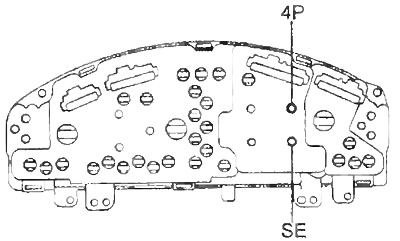
Analog
d) Check that the voltage changes 4 times per revolution of the sensor shaft (appears and disappears).
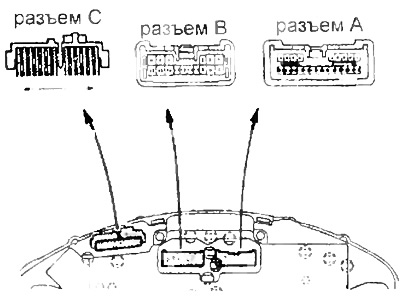
Analog-digital
Checking the tachometer
Analog instrument cluster
1. Connect the calibration tachometer and start the engine.
Note: Reversing the polarity when connecting the tachometer will result in failure of the transistors and diodes.
2. Compare the readings of the calibration and standard tachometers.
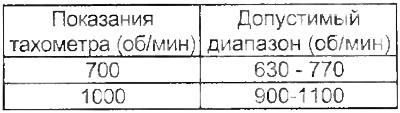
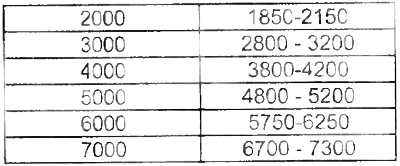
If the error level exceeds the permissible limit, replace the tachometer
Analog-digital instrument cluster
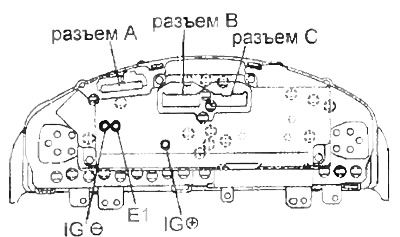
1. Checking the signal.
a) Remove the instrument cluster assembly.
b) Unscrew 4 screws and remove the lower housing.
c) Connect connectors A, B and C.
d) Check the conductivity and voltage between the terminals and the ground according to the table "Checking the tachometer" (analog-digital instrument cluster).
Checking the coolant temperature sensor indicator
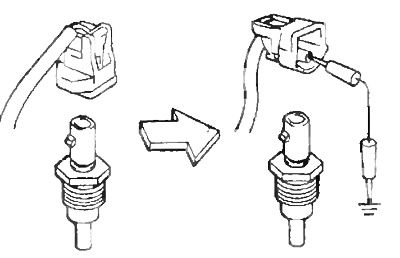
1. Checking the work.
a) Disconnect the coolant temperature sensor indicator connector.
b) Turn on the ignition and make sure that the arrow is in position "C".
c) From the position specified in point (b), short the connector terminal to ground. Make sure that the arrow moves to the "H" position.
Checking the speedometer (analog-digital instrument cluster)

Checking the tachometer (analog-digital instrument cluster)

2. Check the resistance between the terminals of the sensor pointer. Resistance between terminals:
- IG "+" - U — ~ 54 Ohm
- IG "+"-E — ~176 Ohm
- UE — ~230 Ohm
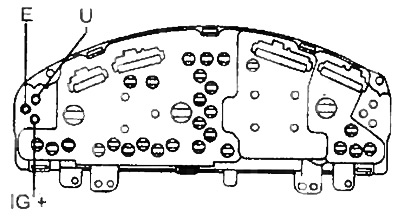
Analog
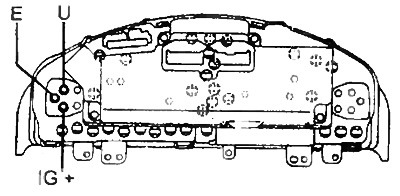
Analog-digital
Checking the coolant temperature sensor
Check the resistance between the sensor terminal and the housing at different temperatures.
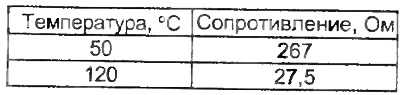 | 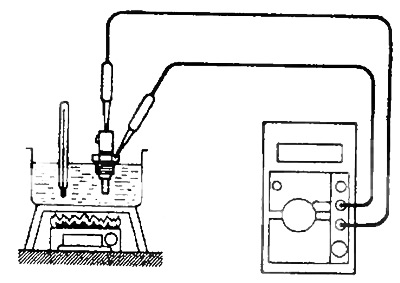 |
Checking the fuel gauge
1. Measurements during work.
a) Remove the rear seat cushion and disconnect the sensor connector.
b) Turn on the ignition and make sure that the arrow is in the "E" position.
c) From the position specified in point (b), short-circuit terminals "2" and "3" of the connector on the wiring harness side. Make sure that the arrow moves to the "F" position.
Note: When the jumper is removed, the arrow will drop to the "E" position after 4 minutes.
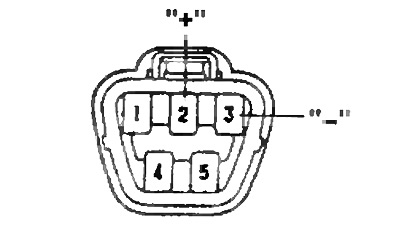
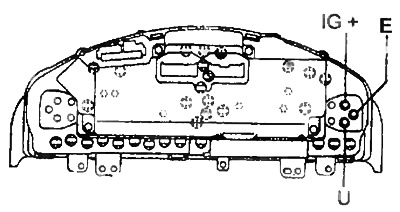
2. Checking the resistance.
Analog
Resistance between terminals:
- IG "+" - U — ~108 Ohm
- IG "+" - E — ~233 Ohm
- U-E — ~ 125 Ohm
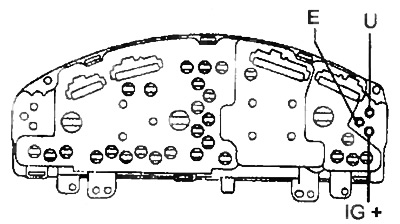
Analog-digital
Resistance between terminals:
- IG "+" - U — ~107 Ohm
- IG "+" - E — ~256 Ohm
- U-E — ~ 150 Ohm
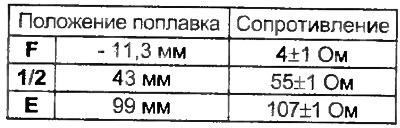
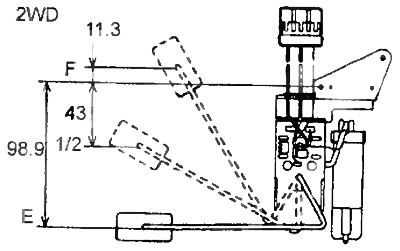
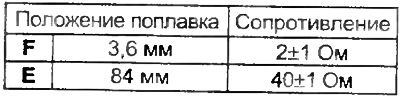
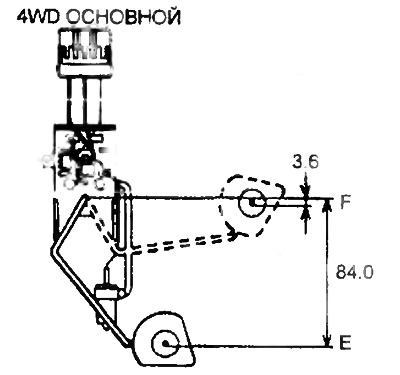
Checking the fuel level sensor
1. Checking the resistance.
a) Remove the fuel level sensor and make sure the float moves smoothly.
b) Measure the resistance between terminals "2" and "1" when moving the float from position "E" to "F". Make sure that the resistance changes smoothly.
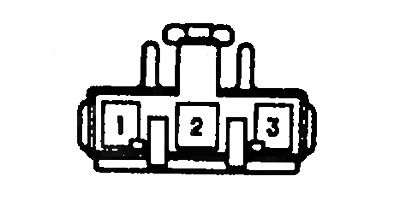
2WD
 |  |
4WD (main)
 |  |
4WD (additional)
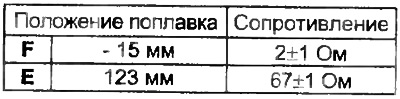 | 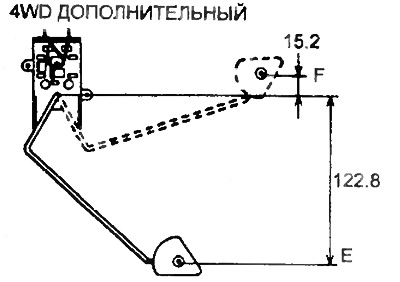 |
Checking the fuel reserve sensor
1. Checking the sensor.
a) Remove the fuel level sensor.
b) Turn on the ignition and make sure that when you lower the sensor into gasoline, the indicator does not light.
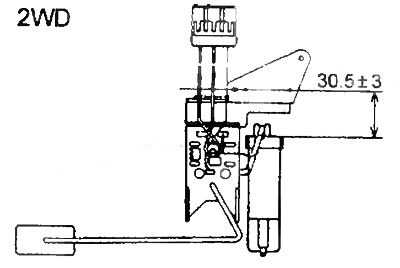
2. Checking the installation height of the sensor (according to the picture).
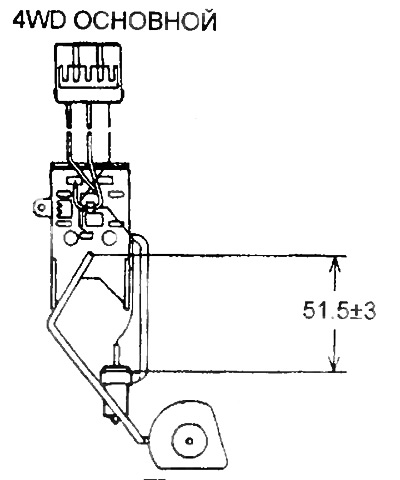
Checking the indicator and sensor for water in the fuel filter
1. Checking the indicator operation.
a) Disconnect the connector from the indicator switch and connect the connector terminals on the indicator side together.
b) Turn on the ignition and check that the indicator lamp lights up and the buzzer sounds.
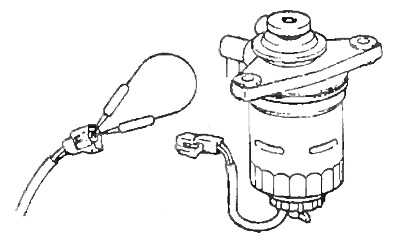
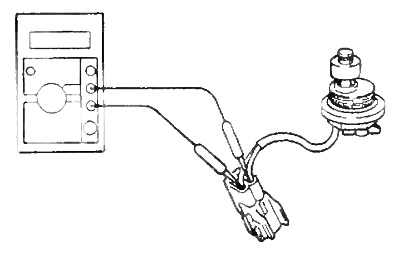
2. Checking the sensor for water in the fuel filter.
a) Remove the fuel filter water presence sensor.
b) Check for continuity between the connector terminals when the switch is in the "OFF" position (the float is down).
c) Check for conductivity between the terminals of the connector in the "ON" switch position (float in the upper position).
Resistance between terminals:
- Float in the upper position - 7.3 - 9.5 Ohm
- Float in the lower position - no conductivity
Checking the trip switch
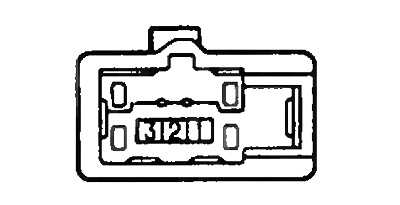
1. Conductivity test.
a) Remove the switch.
b) Check the conductivity between the connector terminals on the switch side.
- Trip switch in the "ON" position - conductivity between terminals "2" and "3".
- Trip reset switch in the "ON" position - conductivity between terminals "1" and "2".
Checking the rheostat
1. Conductivity test.
a) Remove the rheostat.
b) Measure the resistance between the terminals.
Checking the lamp malfunction indicator sensor
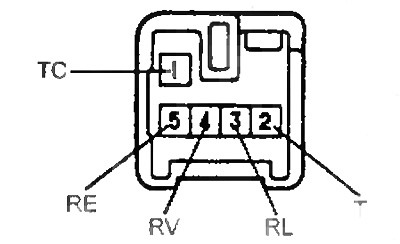
Resistance:
- RL-RE — 10 kOhm
RV-RE
- minimum - 0 Ohm
- maximum - 10 kOhm
TS-T
- neutral position - no conductivity
- the rest are conductivity
Checking the seat belt sensor
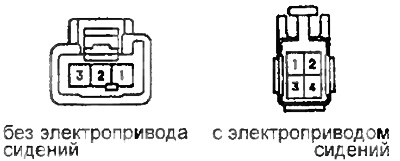
Disconnect the connector and check the continuity between terminals "1" and "3" of the sensor connector.
- The belt is not fastened - there is conductivity
- fastened - no conductivity
Checking the oil pressure sensor
1. Check for continuity between the terminal and ground with the engine not running.
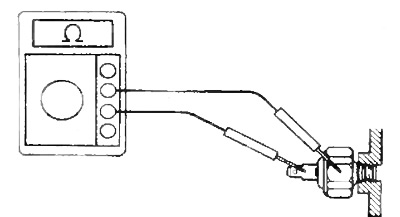
2. Check for continuity between the terminal and ground with the engine running.
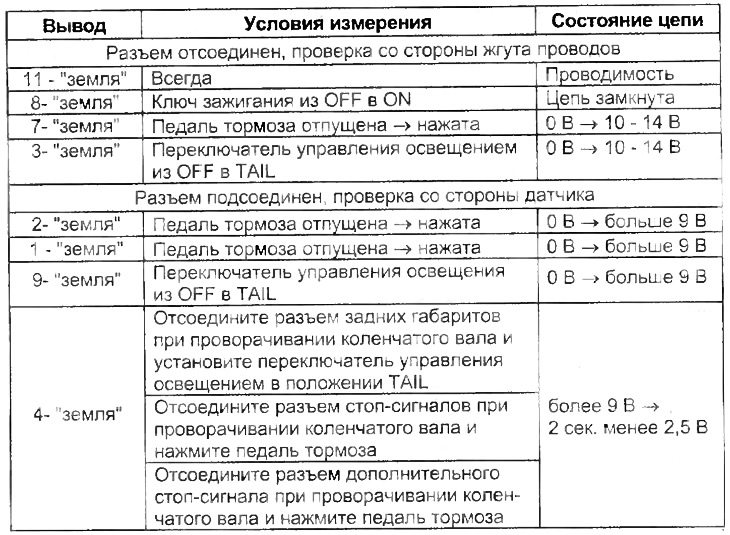
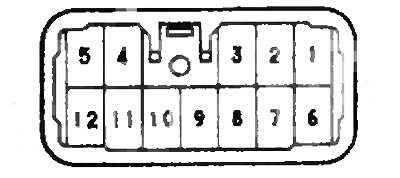
Checking the lamp malfunction indicator sensor
Check according to the table.
Checking the brake system indicator
1. Checking the chain.
a) Disconnect the parking brake switch connector.
b) Turn on the ignition.
c) Ground the connector terminal on the wiring harness side of the parking brake switch and check that the indicator lights up.
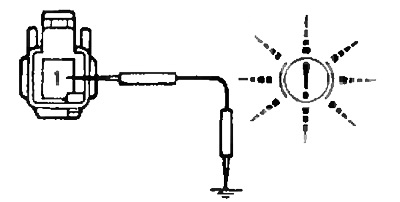
d) Disconnect the low brake fluid level sensor connector.
d) Turn on the ignition.
e) Short the connector terminals on the harness side of the low brake fluid level sensor and check that the indicator lights up.
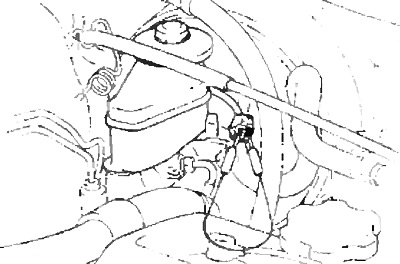
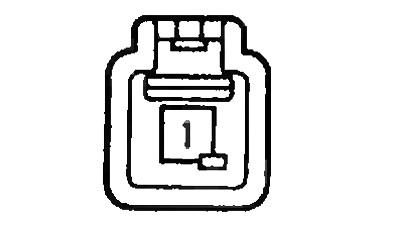
Checking the parking brake sensor
Check the continuity between the sensor connector terminal and ground.
- The rod is pressed - there is no conductivity
- The rod is not pressed - there is conductivity
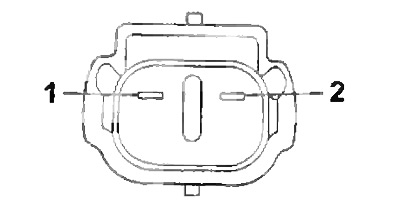
Checking the Low Brake Fluid Level Sensor
1. Disconnect the low brake fluid level sensor connector and connect the tester.
2. Pump out the brake fluid with a syringe and check the conductivity at this time.
- Float on top - no conductivity
- Float at the bottom - there is conductivity
Checking the limit switch
Check the continuity between pin 1 of each connector and ground.
- Switch pressed - no conductivity
- not pressed - there is conductivity
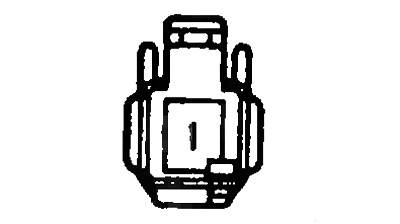
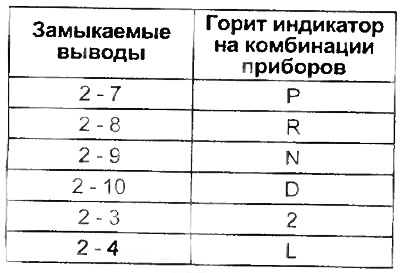
Checking the automatic transmission selector position indicator
Note: the test is performed with the ignition key in the ON position and the automatic transmission selector in the "P" position.
1. Disconnect the automatic transmission selector connector.
2. Turn on the ignition, short-circuit the terminals on the wiring harness side and check that the corresponding indicator on the instrument cluster is lit.
Note: check that when the automatic transmission selector is switched to the "R" position, the corresponding indicator on the instrument cluster lights up and a buzzer sound is heard.
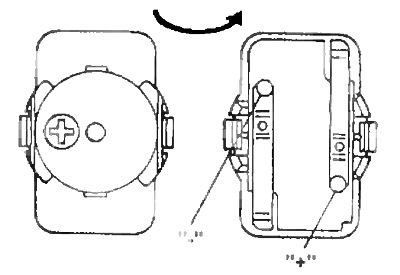
Checking the indicator and buzzer when reversing
1. Check that when you switch the automatic transmission selector to the "R" position, the corresponding indicator on the instrument cluster lights up and a buzzer sound is heard.
2. Remove the buzzer and connect the "+" of the battery to the positive terminal of the buzzer, and to the negative terminal and make sure that the buzzer sounds.
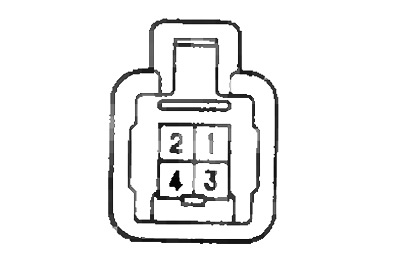
Checking the overdrive indicator
1. Check the conductivity between terminals 2 and 4 of the switch connector in different positions of the latter.
- OD ON - no conductivity
- OD OFF - no conductivity
Checking the automatic transmission operating mode indicator
1. Check the conductivity between the terminals of the switch connector in different positions of the latter.
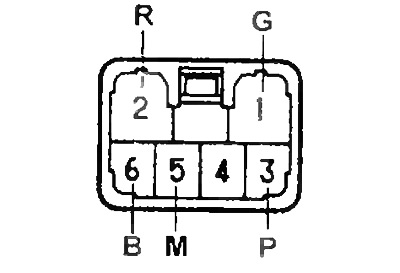 | 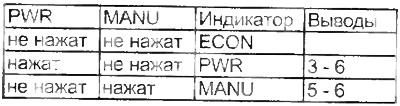 |